
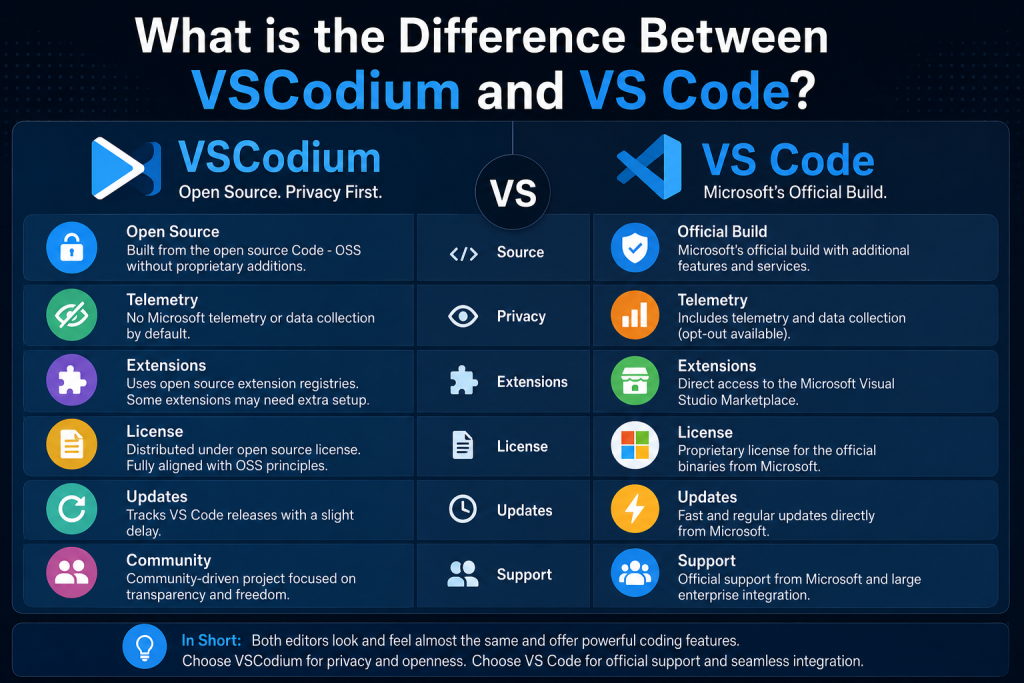
If you’re looking for a powerful code editor, you’ve probably come across both VSCodium and Visual Studio Code (VS Code). At first glance, they appear nearly identical. They share the same interface, support the same programming languages, and offer many of the same features. However, there are some important differences that developers should understand before choosing one over the other.
Whether you’re a beginner learning to code or an experienced developer seeking more privacy and transparency, understanding the distinction between VSCodium and VS Code can help you make the right choice.
Read More: Is VSCodium Free to Use?
Understanding VS Code
VS Code is a popular source-code editor developed by Microsoft. It is built on the open-source project called Code – OSS, which is available publicly for anyone to inspect and modify.
VS Code has become one of the most widely used code editors in the world because it is lightweight, fast, customizable, and supports a massive ecosystem of extensions. Developers use it for web development, software engineering, data science, cloud computing, and many other programming tasks.
Microsoft distributes VS Code with additional customizations, branding, telemetry services, and proprietary components that are not included in the original open-source source code.
What is VSCodium?
VSCodium is a community-driven project that takes the open-source Code – OSS source code and compiles it without Microsoft’s proprietary additions.
In simple terms, VSCodium provides the same core editor experience as VS Code but removes Microsoft’s branding, tracking mechanisms, and certain proprietary features. The goal is to offer a fully open-source version of the editor that prioritizes transparency and user control.
Many developers choose VSCodium because it stays closer to the original open-source philosophy while maintaining compatibility with most VS Code features.
The Main Difference Between VSCodium and VS Code
The biggest difference comes down to how the software is packaged and distributed.
VS Code is Microsoft’s official product. Although it is based on open-source code, the version downloaded from Microsoft’s website includes additional Microsoft-specific components.
VSCodium, on the other hand, is built directly from the open-source source code and excludes those proprietary additions.
For everyday coding tasks, both editors look and behave almost the same. However, differences become noticeable in areas such as telemetry, licensing, and extension management.
Telemetry and Data Collection
One of the most discussed differences between the two editors is telemetry.
VS Code includes telemetry features that collect usage data and diagnostic information. Microsoft uses this data to improve the product and understand how users interact with the editor.
While users can disable much of this data collection through settings, some developers prefer software that does not include telemetry by default.
VSCodium removes Microsoft’s telemetry components during the build process. This makes it an attractive option for privacy-conscious users who want a cleaner open-source experience without additional tracking.
Licensing Differences
Another important distinction involves licensing.
The source code behind VS Code is open source, but Microsoft’s official VS Code binaries are distributed under Microsoft’s own license terms. This means the downloadable application is not exactly the same as the open-source project itself.
VSCodium distributes builds generated directly from the open-source Code – OSS repository. As a result, many users view it as a more purely open-source alternative.
For developers who strongly value open-source software principles, this can be a significant factor when choosing between the two.
Extension Marketplace Access
Extensions are one of the most powerful features of both editors.
VS Code provides direct access to the official Microsoft Visual Studio Marketplace, where users can install thousands of extensions for programming languages, frameworks, themes, debugging tools, and productivity enhancements.
VSCodium does not include direct access to Microsoft’s marketplace by default due to licensing restrictions. Instead, it typically uses open-source extension registries.
This means some extensions available in VS Code may require additional configuration before they can be installed in VSCodium. While most popular extensions remain accessible, the process may not be as seamless.
Updates and Release Timing
Microsoft releases updates for VS Code on a regular schedule. Users typically receive new features, bug fixes, and security improvements immediately through the official distribution channels.
VSCodium updates usually follow shortly after the corresponding VS Code release. Since the project rebuilds the open-source code separately, there can sometimes be a slight delay before new versions become available.
For most users, this delay is minor and rarely affects daily development work.
Performance Comparison
In terms of performance, there is very little difference between VSCodium and VS Code.
Both editors are built from the same codebase, meaning startup speed, memory usage, editor responsiveness, and coding capabilities are nearly identical.
Any performance differences are generally negligible and unlikely to influence your choice.
Which One Should You Choose?
The best option depends on your priorities.
VS Code is ideal for developers who want the official Microsoft experience, seamless marketplace integration, frequent updates, and maximum compatibility with extensions and cloud services.
VSCodium is a great choice for users who prefer open-source software, want telemetry removed by default, and value greater transparency in the tools they use.
For many programmers, either editor can serve as an excellent development environment. The coding experience remains largely the same regardless of which option you choose.
Advantages of VS Code
- Official support from Microsoft
- Direct access to the Visual Studio Marketplace
- Fast and reliable updates
- Better integration with Microsoft services
- Large community and extensive documentation
Advantages of VSCodium
- Fully open-source build
- No Microsoft telemetry by default
- Greater transparency and privacy
- Community-driven development
- Familiar VS Code experience without proprietary additions
Conclusion
The difference between VSCodium and VS Code is not about coding features or performance. Both editors are built from the same foundation and provide an excellent development experience. The real distinction lies in privacy, licensing, telemetry, and distribution methods.
If you want the official editor with effortless access to extensions and Microsoft services, VS Code is likely the better choice. If you prefer a fully open-source alternative that removes Microsoft’s proprietary elements, VSCodium is an excellent option.
Ultimately, both tools are powerful, modern code editors capable of handling everything from simple scripts to large-scale software projects. Your decision should be based on whether you prioritize convenience and official support or openness and privacy.